
The Clinician-Founder’s AI Stack
How I compress the cycle from idea to artifact—and why generative UI is the modern memo

Two ways to read this:
🔗 Interactive guide → Click here for the hands-on web version with expandable sections and copy-paste prompts
📖 Full breakdown → Read on to learn what my workflow is and for paid subscribers the step by step guide (in 10 minutes), for how I created these images this interactive website, and systematized this entire workflow
My Core AI Workflow
The productivity advice for AI doesn’t really translate to healthcare.
Every tutorial assumes you have thirty uninterrupted minutes to craft prompts, iterate on outputs, and polish results. The screenshots show tidy workflows on pristine desktops. The use cases like summarizing meetings, drafting marketing copy, and brainstorming content ideas assume your primary constraint is creativity, not time.
Clinician-founders operate under different physics. Our days fragment across OR cases, clinic sessions, investor calls, product reviews, and the thousand small decisions that running a company requires. The windows for deep work are measured in minutes. Any AI system that requires sustained attention is dead on arrival. Don’t get me started on all those N8N and Zapier youtube videos…
Over the past eighteen months, I’ve built what I think of as an operating system for this reality. The workflow is optimized for clinician-founders, but the principles apply more broadly: to operators looking to reclaim their time, to executives who need leverage over their output, to anyone who wants a different outlet for creative work without sacrificing the hours that matter most. The goal isn’t productivity in the abstract. Rather, it’s compressing two specific cycles:
The iteration cycle: How quickly can I move from rough idea to polished artifact?
The information transfer cycle: How efficiently can I move knowledge from my head to my tools, my patients, my team, my investors, and to anyone I need to convince that I understand their problem and can solve it?
Both cycles depend on the same insight: as a clinician-founder, your advantage is deep subject matter expertise. You know things. The bottleneck is getting what you know into formats that communicate, persuade, and scale. AI compresses that bottleneck.
What follows is the system I actually use.
The Stack: Capture → Process → Create → Distribute
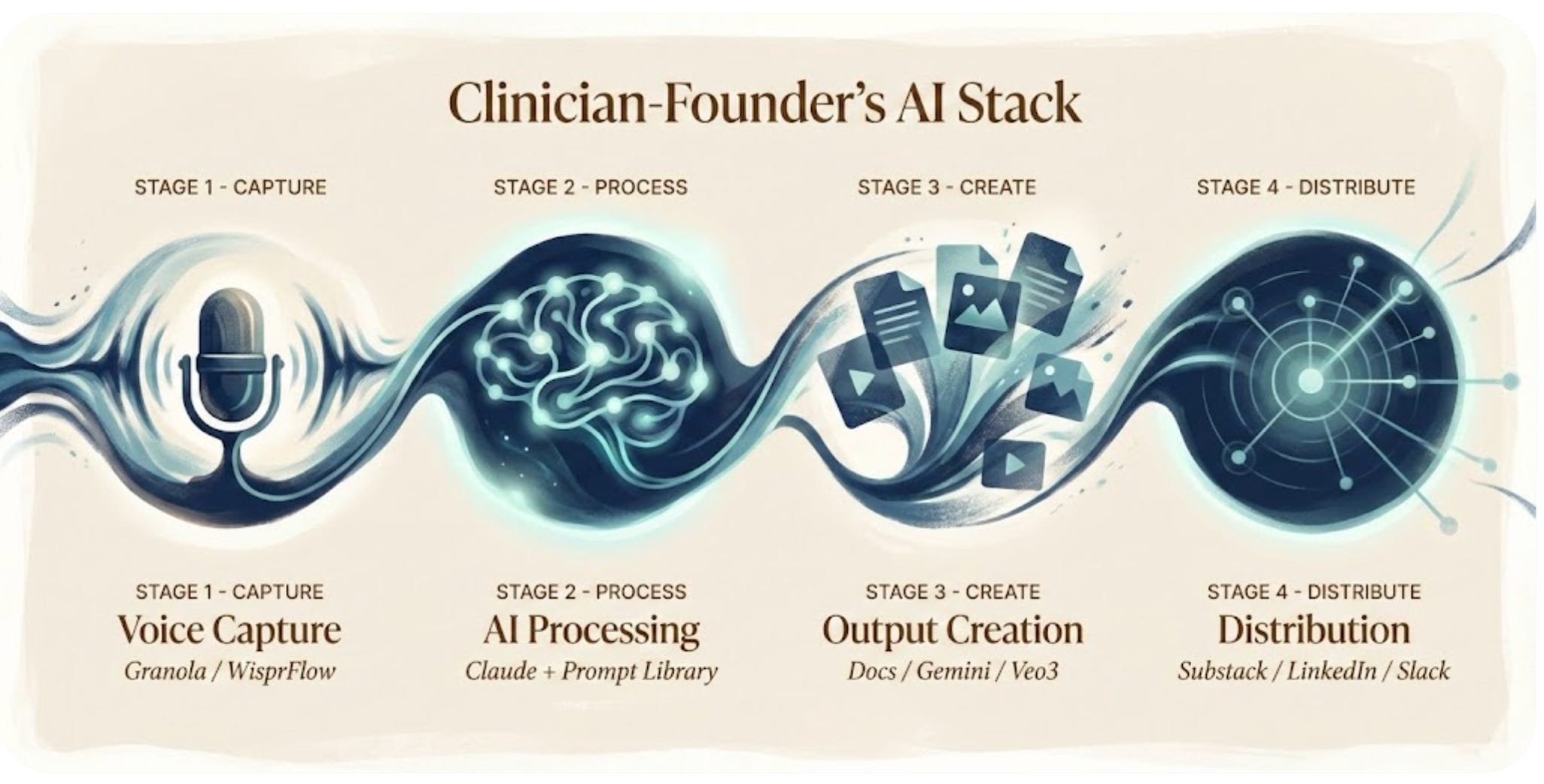
Stage 1: Voice Capture
The insight that changed everything: I don’t type my ideas. I speak them.
Two tools handle capture:
Granola runs during every meeting: investor calls, product reviews, customer conversations. It records, transcribes, and generates structured notes automatically. I review nothing during the meeting itself. Afterward, I have a searchable record of every decision, commitment, and insight worth preserving. What I really like about Granola is that I can create folders and cluster documents around a theme or a group together and chat with the entire folder of previous meetings. Often, I’ll take the transcript itself rather than just use the meeting notes and then take those with me into stage 2 of my workflow.
WisprFlow handles everything else. Walking to the OR, I voice-memo a thought about a newsletter piece. Driving home, I dictate feedback on a product design. The audio becomes text instantly, synced and waiting. Of note, Wispr Flow has a shorter duration, so if I have a very long voice memo or piece that I want to speak from beginning to end, that’s longer than 2 minutes or so, I use Granola and take the transcript into my processing step.
The capture layer has one job: ensure no idea requires me to stop what I’m doing to record it. If it demands pulling out a laptop or opening an app with intention, it won’t happen. Voice is the only input method that survives the fragmentation of clinical life.

Stage 2: AI Processing
Everything captured flows to Claude.
I chose Claude over ChatGPT for a specific reason: I find it handles nuance better and creates predictable, repeatable workflows through the “skills” function, which I’ll get into in a second. Healthcare content requires precision—regulatory details, clinical accuracy, appropriate caveats. Claude’s outputs require less correction, which matters when editing time is the scarcest resource.
But the real leverage isn’t the model. It’s the prompt library, though “prompts” undersells what these actually are. They’re encapsulated workflows. Decision trees. Brand guidelines. Document architectures. They encode choices I’ve already made so I don’t make them again. And this is really the differentiator for Anthropic’s Claude. It’s not so much that Claude allows you to have “custom GPTs” with simple instructions. It has true near-agentic workflows, where you will produce an HTML or a PDF or an excel sheet in a similar style and can apply multiple repeatable prompts on top of one another, letting the Claude agent complete a task end-to-end in a near magical fashion.
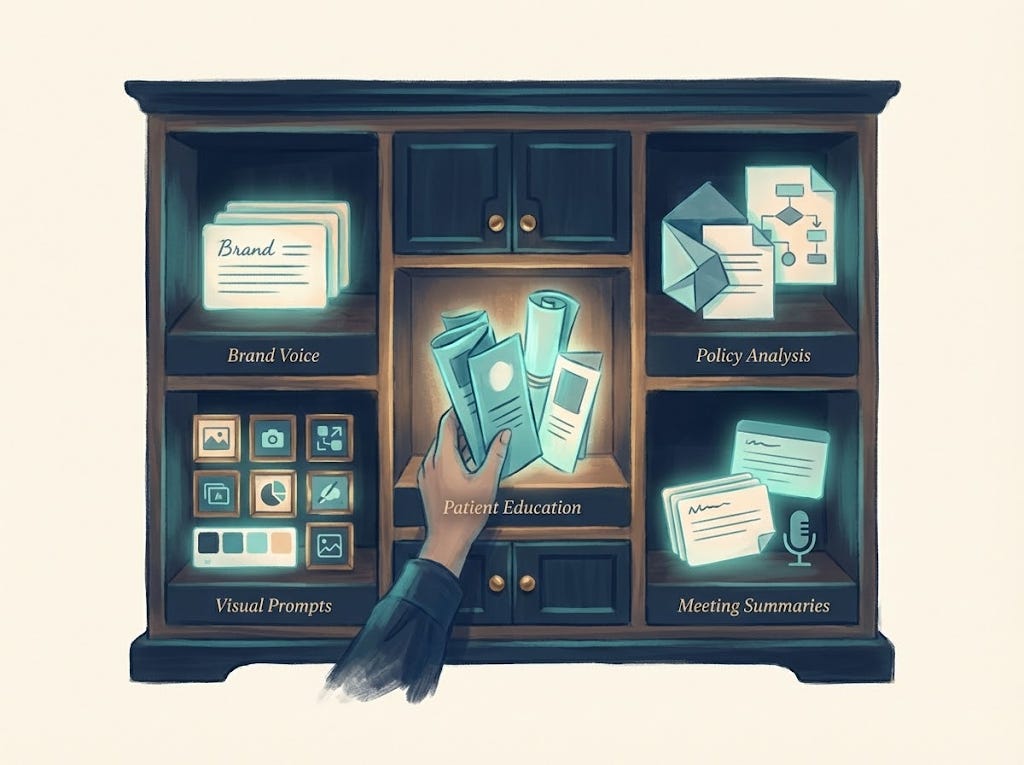
What the skills “prompt” library contains:
Brand voice guidelines for RevelAi Health, Techy Surgeon, and Duke presentations
Document templates: whitepapers, one-pagers, investor updates, academic abstracts
Visual prompt frameworks for consistent illustration style
Patient journey content structures with health literacy constraints
Policy analysis templates with citation requirements
Meeting summarization flows for different contexts
Building this library happened iteratively over months. Using it takes seconds.
One thing worth noting: I’ve come to believe that generative UI is the modern memo. Our team at RevelAi often communicates updates, plans, and proposals through HTML artifacts generated in Claude—interactive, visual, immediately legible. The static Word document feels increasingly archaic when you can produce something that demonstrates rather than describes.
Stage 3: Output Creation
Claude produces text and structured outputs. But the stack extends beyond language models.
Documents: Word files, PDFs, slide decks, HTML memos—formatted, branded, ready to share. Not drafts requiring hours of cleanup. Production-ready artifacts.
Images: I generate detailed visual prompts in Claude, then run them through Gemini’s Imagen (specifically the “nanobanana” configuration for high-quality outputs). The prompt library ensures visual consistency across everything I publish.
Video: For animated content, the workflow shifts. Veo3 generates video clips from prompts. I string them together in CapCut, adding transitions and pacing. For narration, I sometimes record voice tracks myself with a microphone. Other times, I use a voice clone I created through ElevenLabs. Some of you may have noticed this in recent videos.
Patient-facing content: Education materials, journey touchpoints, SMS sequences. These require particular care: health literacy standards, appropriate reading level, clinical accuracy. The prompt workflows encode all of it.

The key is that outputs are production-ready, not rough drafts. When time is scarce, the gap between “draft” and “finished” is where productivity gains die.
Stage 4: Distribution
Distribution remains the least automated part of the stack.
Content flows to Substack (long-form analysis), LinkedIn (professional visibility and shorter insights), X (broader reach), Slack (internal team communication), and occasionally email for direct outreach.
I’ve tried tools that promise to automate cross-platform distribution. Hootsuite was too complex for my workflow, with more configuration overhead than time saved. I’ve heard Blotato works well (Sabrina Romanov recommends it), but I haven’t tested it yet.
For now, I repurpose manually. A newsletter becomes LinkedIn posts. A policy analysis becomes X threads. An internal memo becomes a Slack update. The upstream investments of voice capture, prompt library, and production-ready outputs make this sustainable. Without them, I’d never have enough content to distribute.
The Split-Tab Workflow
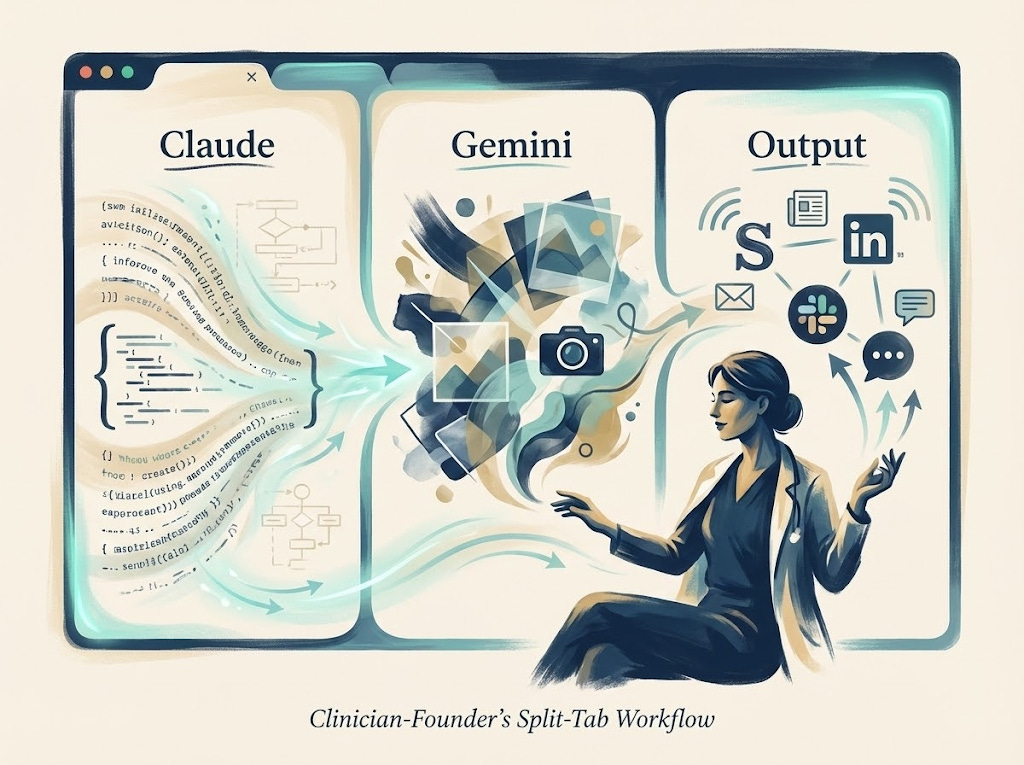
In practice, this is how the system runs: Claude (or ChatGPT for writing tasks) on the far left for processing and generation, Gemini in the center for image creation, and the output layer (Substack, LinkedIn, whatever destination) on the right.
The physical arrangement matters to me. Ideas flow left to right. Voice memos enter on the left, polished artifacts exit on the right. The split-tab layout externalizes the workflow, reducing the cognitive load of remembering what goes where. I’ve actually tried to mimic this design flow in RevelAi Health’s user interface, flowing from left to right, from input to output
This is the setup I use for:
Summarizing meetings into actionable documents
Creating patient education materials
Drafting newsletters and thought leadership
Building presentations for academic conferences, investor meetings, or health system pitches
Each context has its own branding guidelines encoded in the prompt library. Techy Surgeon content looks different from Duke presentations looks different from RevelAi investor updates. The system handles the formatting; I handle the thinking.
What This System Cannot Do
Epistemic humility requires acknowledging limits.
Clinical decision-making: I do not use these AI tools for direct patient care decisions. The regulatory, liability, and safety considerations are too significant. RevelAi’s AI—KIMI—operates under strict clinical protocols with human oversight at every step. My personal stack stays far from the clinical encounter.
Real-time iteration: AI is a batch processor in this workflow, not a conversational partner. If I have time for extended back-and-forth refinement, my flow changes slightly. The prompts produce usable outputs on the first pass, or they need to be rewritten.
Genuine origination: AI accelerates production of content within established frameworks. It’s less useful for truly novel ideas, unexpected angles, original insights. Those still require human cognition. The system amplifies what you know. It doesn’t know things for you. though I will say that this flow can help you learn new topics if your input becomes knowledge that you are trying to ingest, manipulate, and represent in new ways. Like for example, a request for applications from CMS or a new research paper. I’ll dive more into how I learn using AI on a future AI-Ops article if this piece resonates
The Compression
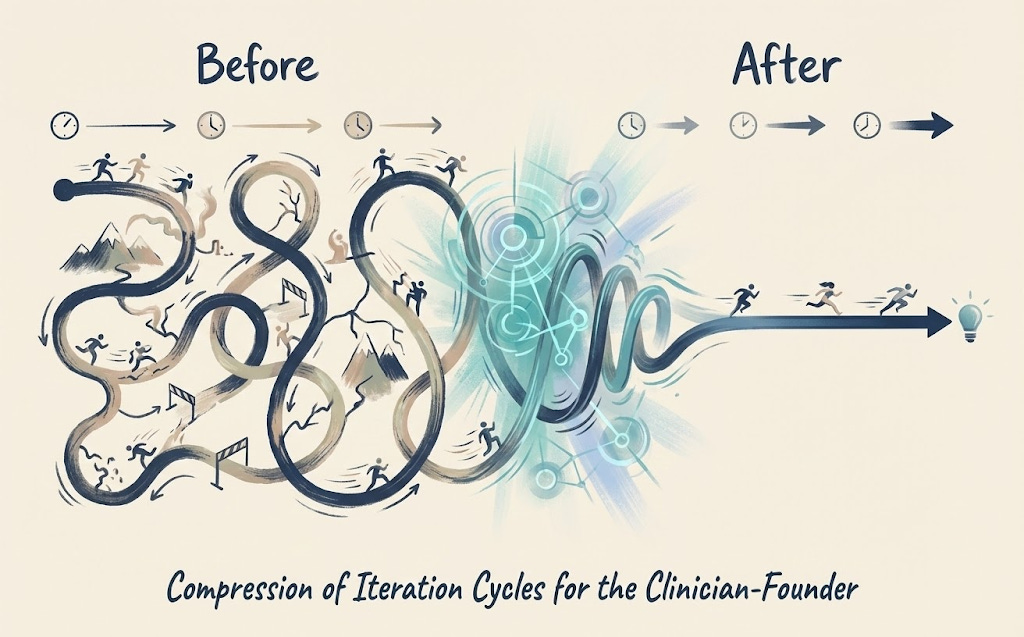
Here’s what the system produces in practice.
On a Sunday evening, roughly two hours:
Review voice memos captured during the week
Process 3-4 through Claude with appropriate workflow prompts
Generate visual prompts, run through Gemini
Assemble and schedule the week’s content
That two hours yields:
1 newsletter (1,500-2,000 words with custom visuals)
3-4 LinkedIn posts
1-2 Substack Notes
Internal documents that accumulated during the week
The math only works because the prompt library eliminates decision fatigue and voice capture eliminates lost ideas. Without both, every session starts from scratch.
More importantly: the cycle from idea to artifact compresses from days to hours. The cycle from expertise to communication compresses from “I should write something about this” to “here’s the document.”
That compression is the point. As a clinician-founder, you already know things worth sharing. The question is whether your system lets you share them—or whether the friction of production keeps your expertise trapped in your head.
Why This Matters: The Multiple Hats Problem

I’ll be direct about something: this system isn’t about optimization for its own sake. It’s about making the math of my life work.
I’m a surgeon. I run a company. I write this newsletter. I sit on committees and advise health systems and try to stay current on policy. And I have a seven-month-old daughter and a three-year-old son who deserve a father who is present, not perpetually distracted by the next thing that needs producing.
The multiple hats don’t balance themselves. Without a system, something always suffers. Usually the things that matter most but don’t have deadlines attached.
What AI gives me isn’t more hours. It’s the ability to compress work into the hours I have, so the hours I don’t work can actually be about something else. Bedtime routines. The gym. Weekend mornings. The unscheduled time where life actually happens.
That’s why I care about this. Not because productivity is intrinsically interesting, but because the alternative (always behind, always producing, always owing something to someone) is unsustainable. The system creates margin. The margin creates presence.
What’s Next
This piece covers my entrepreneurial AI stack—the tools for content, communication, and company-building.
But there’s a separate stack I haven’t discussed: the clinical AI stack. The tools I use in actual patient care and clinical decision-making. That’s a different set of considerations with different tools, different constraints, and different risks.
The clinical stack includes:
OpenEvidence for evidence synthesis at the point of care
Doximity GPT for clinical queries within a physician-specific context
RevelAi Health’s KIMI for care coordination and patient engagement
I’ll write about that separately. The considerations are different enough that they deserve their own treatment.
I Want Your Feedback
This is an experiment. I’m testing whether this kind of content (practical AI workflows for clinician-founders, healthcare leaders, and operators) is useful to the Techy Surgeon audience.
If it resonates, I’ll go deeper. Possibilities include:
Deep dives on specific workflows:
How I generate client-specific whitepapers from a single voice memo
The Instagram carousel workflow (prompt → Gemini → scheduling)
Policy analysis: from CMS document to published newsletter in 90 minutes
Step-by-step video walkthroughs:
Screen recordings of the split-tab workflow in action
Building a prompt skill from scratch
Voice capture → finished artifact in real time
The prompt library itself:
PDF builders
Patient education templates
Meeting summarization flows
Visual prompt frameworks
The clinical AI stack:
Tools for point-of-care decision support
Evidence synthesis workflows
Where AI helps in clinical practice—and where it doesn’t
Tell me what would be useful. Reply to this email, drop a comment, or find me on LinkedIn. I’ll build what you actually need, not what I assume you want.
The goal is to help other clinician-founders, healthcare leaders, and operators compress the same cycles I’ve been working on. Whether you’re building a company, running a department, or just trying to get your time back, the principles are the same. If this is the content that helps, I’ll keep going.
Tools Mentioned
Voice Capture:
AI Processing:
Output Creation:
Gemini – Google’s AI with Nano Banana Pro for image generation
Veo3 – Google’s video generation
CapCut – Video editing
ElevenLabs – Voice cloning and text-to-speech
Distribution:
Substack – Newsletter platform
Blotato – Cross-platform scheduling (haven’t tried yet, but recommended)
Clinical AI Stack (future article):
OpenEvidence – Clinical evidence synthesis
UpToDate Expert AI – Point-of-care clinical decision support
Doximity GPT – Physician-specific AI
Abridge – Ambient clinical documentation (my current health system scribe)
RevelAi Health – AI-powered care coordination and conversational AI agents
For Paid Subscribers, I have an example of a workflow I used to create an interactive HTML below.
You can apply this kind of flow to create interactive artifacts for clients, for yourself, really for a lot of use cases. The only limitation is your imagination.
How to Create Your Own Interactive Workflow Guide
This document explains how I created the “Techy Surgeon AI Workflow Starter Kit” HTML guide, so you can create similar interactive guides for your own workflows, tutorials, or documentation.
